Joins and Keys Lab
Introduction
This lab is meant to introduce you to Keys, Joins and Constraints.
Terminal
- Reset the coffeeshop schema
- Connect to the RDS instance and coffeeshop db
-
The simplest way to create a primary key is with a built in function, we will talk more about these later. For now just realize they enable us to automate things within SQL. Postgres makes this easy by providing us with the
SERIALdata-type. To use this execute the following SQL.CREATE TABLE MAIN.ADDRESS( ID SERIAL PRIMARY KEY, ADDRESS_LINE1 VARCHAR(100) NOT NULL );You should see the following when you type
\d+ MAIN.ADDRESS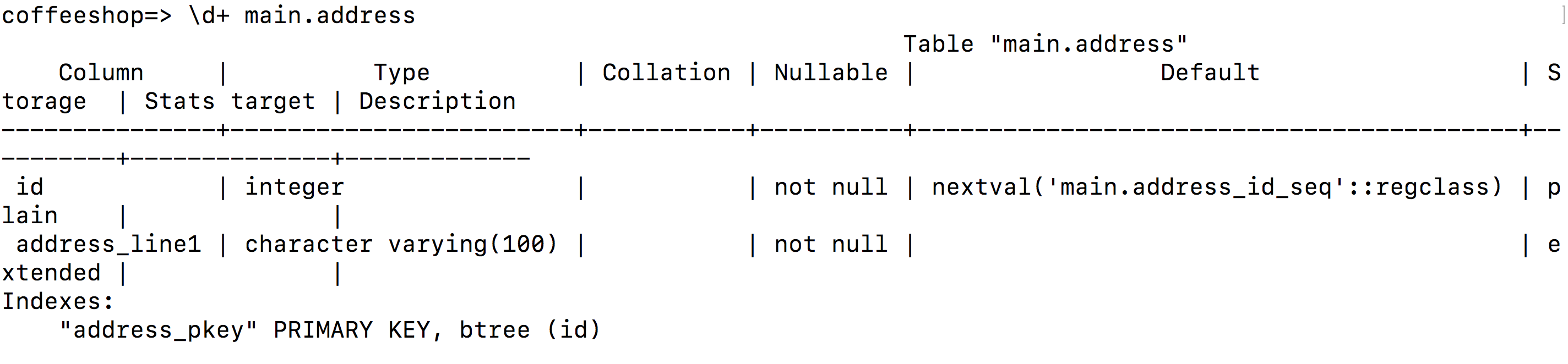
Notice that according to the documentation.
Technically, a primary key constraint is simply a combination of a unique constraint and a not-null constraint.
This means you could also use
NOT NULL UNIQUEinstead. -
Now let’s insert an ADDRESS
INSERT INTO MAIN.ADDRESS (ADDRESS_LINE1) VALUES ('400 W. Broad St Columbus, OH 43217');-
Notice that if you try to add an Address with a null ID it fails thanks to the constraint.
  INSERT INTO MAIN.ADDRESS (ID, ADDRESS_LINE1) VALUES (null, '400 W. Broad St Columbus, OH 43217');

  ERROR:  null value in column "id" violates not-null constraint
  DETAIL:  Failing row contains (null, 400 W. Broad St Columbus, OH 43217).
this is due to the PRIMARY KEY constraint.
-
-
We can also look at what is called a constraint. let’s create the PERSON table.
CREATE TABLE MAIN.PERSON( ID SERIAL PRIMARY KEY, NAME VARCHAR(100) NOT NULL, PHONE VARCHAR(13) NOT NULL, EMAIL VARCHAR(100) NOT NULL, ADDRESS_ID INTEGER NOT NULL REFERENCES MAIN.ADDRESS(ID), CONSTRAINT EMAIL_CHECK CHECK (EMAIL ~* '^[A-Za-z0-9._%-]+@[A-Za-z0-9.-]+[.][A-Za-z]+$') );- The first constraint is a foreign key relationship. This is when a table requires an entry in another table. For this example we will use the concept of a Person. In our world a person MUST have an address so we add the following
ADDRESS_ID SERIAL NOT NULL REFERENCES MAIN.ADDRESS(ID). - The other constraint is a RegEx pattern used to make sure the email address is correct. I am just going to gloss over that for now.
- The first constraint is a foreign key relationship. This is when a table requires an entry in another table. For this example we will use the concept of a Person. In our world a person MUST have an address so we add the following
-
let’s try to add a Person with an invalid Address ID.
INSERT INTO MAIN.PERSON (NAME,PHONE,EMAIL,ADDRESS_ID) VALUES ('John Doe','6142145417','a@b.com','420');Notice we get an errorERROR: insert or update on table "person" violates foreign key constraint "person_address_id_fkey" DETAIL: Key (address_id)=(420) is not present in table "address".This is because the ID doesn’t exist in Address.
- The ID of the Address created in step 1 was auto generated and not returned so the easiest way to handle this is to select the record from the table. In our case this is super easy because it is the only one. We just use
SELECT * FROM MAIN.ADDRESS;. It should always be 1 because of the serial, unless you made a mistake somewhere. - Now we need to use that ID to add a Person who uses that ID.
INSERT INTO MAIN.PERSON (NAME,PHONE,EMAIL,ADDRESS_ID) VALUES ('John Doe','6142145417','a@b.com','1'); -
Now let’s say our users wants a list of all user names and their address. This is where we would use a Join to join the tables
 SELECT
   MAIN.PERSON.NAME,
   MAIN.ADDRESS.ADDRESS_LINE1
 FROM MAIN.PERSON
 INNER JOIN MAIN.ADDRESS ON MAIN.ADDRESS.ID = MAIN.PERSON.ADDRESS_ID;
You should see the following….
name | address_line1 ----------+--------------------------------- John Doe | 400 W. Broad Columbus, OH 43217 (1 row) -
Next we will explore how to deal with other types of joins. To start this let’s make a Store relation that has an address and can also reference a manager. In our world a Manager will be optional and our store doesn’t have one.
CREATE TABLE MAIN.STORE( ID SERIAL PRIMARY KEY, NAME VARCHAR(100) NOT NULL, MANAGER_ID INTEGER NOT NULL REFERENCES MAIN.PERSON(ID), ADDRESS_ID INTEGER REFERENCES MAIN.ADDRESS(ID) ); -
Now let’s add a couple store addresses
INSERT INTO MAIN.ADDRESS (ADDRESS_LINE1) VALUES ('420 Hubbard Ave Columbus, OH 43201'); INSERT INTO MAIN.ADDRESS (ADDRESS_LINE1) VALUES ('240 North Fourth Street Columbus, OH 43201'); -
Now we can assign the first Address to the store, remember to double check the serial of the record you are using.
INSERT INTO MAIN.STORE (NAME, MANAGER_ID, ADDRESS_ID) VALUES ('Store 1', 2, 2); INSERT INTO MAIN.STORE (NAME, MANAGER_ID, ADDRESS_ID) VALUES ('Store 2', 2, null); -
To get all of the stores regardless of whether they are associated with a person. To do this we use a
LEFT OUTER JOIN. This returns all records from the left side of the join, even if there is no right side record. If we try again like this…SELECT MAIN.STORE.NAME, MAIN.ADDRESS.ADDRESS_LINE1 FROM MAIN.STORE LEFT OUTER JOIN MAIN.ADDRESS ON MAIN.STORE.ADDRESS_ID = MAIN.ADDRESS.ID;Now we should see 2 records…
   name   |           address_line1
 ---------+------------------------------------
  Store 1 | 420 Hubbard Ave Columbus, OH 43201
  Store 2 |
 (2 rows)
Notice that Store 2 shows up, even though there is no address.
-
If we only wanted stores that had addresses we can use an Inner join instead of an Outer join.
 SELECT
   MAIN.STORE.NAME,
   MAIN.ADDRESS.ADDRESS_LINE1
 FROM MAIN.STORE
 INNER JOIN MAIN.ADDRESS ON MAIN.STORE.ADDRESS_ID = MAIN.ADDRESS.ID;
Now we only see the stores that have an address…
 name   |           address_line1
 ---------+------------------------------------
 Store 1 | 420 Hubbard Ave Columbus, OH 43201
 (1 row)
Takehome Work
- What are the disadvantages to using
SERIALfor IDs? Is there a better way? - What is the difference between a LEFT Outer Join and a RIGHT Outer join?
- Create a constraint that ensures there are no special characters in a person’s name.
- Create a schema of tables that can be used to track Customer transaction by store.
- Create a way to store the user’s favorite store.
- How would we handle multiple locations either nearby or at the same address.